Создание этой страницы стало возможно благодаря книге:
Coding Roblox Games Made Easy (Zander Brumbaugh)Изучаем lua вместе и меняем миры, следуя за своими мечтами!
Создание этой страницы стало возможно благодаря книге:
Coding Roblox Games Made Easy (Zander Brumbaugh)Изучаем lua вместе и меняем миры, следуя за своими мечтами!
Векторы используются для представления направлений и величин в 3D пространстве. Запустите Roblox Studio, создайте объект Script в ServerScriptService и попробуйте код ниже.
В Lua векторы представлены с помощью Vector3.new(x, y, z). Пример:
-- Создание вектора
local vectorA = Vector3.new(4, 5, 6)
local vectorB = Vector3.new(1, 2, 3)

-- Арифметика с векторами
local vectorSum = vectorA + vectorB
local vectorDiff = vectorA - vectorB
local vectorScaled = vectorA * 2

print("Vector Sum:", vectorSum)
print("Vector Difference:", vectorDiff)
print("Vector Scaled:", vectorScaled)
Задание: Создайте еще два вектора, сложите их и выведите результат.
Для отображения векторов в Roblox Studio можно использовать Beam и Part. Следующий код рисует один вектор:
-- это функция для отрисовки вектора, её нужно правильно вызвать по имени
local function drawVector(startPos, endPos, color, labelText, parentFolder)
	local folder = parentFolder or Instance.new("Folder")
	if not parentFolder then
		folder.Name = "Vectors"
		folder.Parent = workspace
	end

	-- Создаём два Attachment (начало и конец)
	-- Attachment должен быть вложен в объект,
	-- а не просто существовать сам по себе.
	local attachment0 = Instance.new("Attachment")
	attachment0.Position = startPos
	attachment0.Parent = workspace.Terrain

	local attachment1 = Instance.new("Attachment")
	attachment1.Position = endPos
	attachment1.Parent = workspace.Terrain

	-- Создаём Beam (луч)
	local beam = Instance.new("Beam")
	beam.Attachment0 = attachment0
	beam.Attachment1 = attachment1
	beam.Width0 = 0.2
	beam.Width1 = 0.2
	beam.Color = ColorSequence.new(color or Color3.fromRGB(0, 255, 0))
	beam.Parent = folder

	-- Создаём шар (наконечник стрелки)
	local ball = Instance.new("Part")
	ball.Shape = Enum.PartType.Ball
	ball.Size = Vector3.new(0.5, 0.5, 0.5)
	ball.Position = endPos
	ball.Color = beam.Color.Keypoints[1].Value
	ball.Material = Enum.Material.Neon
	ball.Anchored = true
	ball.Parent = folder

	-- Определяем середину вектора
	local midpoint = (startPos + endPos) / 2

	-- Создаём подпись (BillboardGui) в середине
	local billboard = Instance.new("BillboardGui")
	billboard.Size = UDim2.new(4, 0, 1, 0)
	billboard.StudsOffset = Vector3.new(0, 1, 0)
	billboard.AlwaysOnTop = true
	billboard.Parent = folder

	local textLabel = Instance.new("TextLabel")
	textLabel.Size = UDim2.new(1, 0, 1, 0)
	textLabel.BackgroundTransparency = 1
	textLabel.Text = labelText or "Вектор"
	textLabel.TextColor3 = beam.Color.Keypoints[1].Value
	textLabel.TextScaled = true
	textLabel.Font = Enum.Font.SourceSansBold
	textLabel.Parent = billboard

	-- Создаём невидимый Part для BillboardGui
	local textPart = Instance.new("Part")
	textPart.Size = Vector3.new(0.1, 0.1, 0.1)
	textPart.Position = midpoint
	textPart.Transparency = 1
	textPart.Anchored = true
	textPart.CanCollide = false
	textPart.Parent = folder

	billboard.Parent = textPart

	return folder
end
-- Исходный вектор
local start = Vector3.new(0, 1, 0)
local endPos = Vector3.new(5, 2, 0)
local color = Color3.fromRGB(255, 0, 0)
-- Вызов функции
drawVector(start, endPos, color, "V1")
-- Добавтьте еще несколько векторов с разными цветами и разными направлениями
Задание: Используйте функцию drawVector для отрисовки трёх векторов разного цвета.
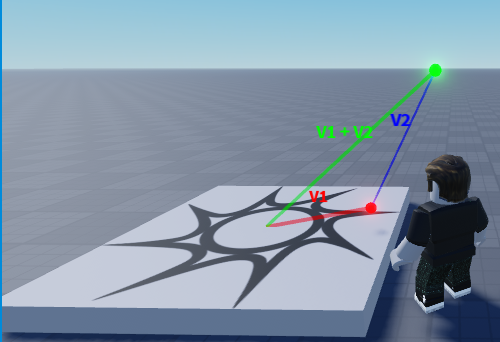
Следующий код показывает, как складываются два вектора и как это можно визуализировать (этот код требует функцию drawVector).
local function demoVectorSum()
	local folder = Instance.new("Folder")
	folder.Name = "VectorSumDemo"
	folder.Parent = workspace

	-- Исходные векторы
	local v1_start = Vector3.new(0, 1, 0)
	local v1_end = Vector3.new(5, 2, 0)

	local v2_start = v1_end -- Второй вектор начинается там, где закончился первый
	local v2_end = v2_start + Vector3.new(3, 6, 0)

	-- Сумма векторов
	local sum_start = v1_start
	local sum_end = v2_end

	-- Рисуем векторы
	drawVector(v1_start, v1_end, Color3.fromRGB(255, 0, 0), "V1", folder) -- Красный
	drawVector(v2_start, v2_end, Color3.fromRGB(0, 0, 255), "V2", folder) -- Синий
	drawVector(sum_start, sum_end, Color3.fromRGB(0, 255, 0), "V1 + V2", folder) -- Зелёный (сумма)
end

-- Вызов функции для демонстрации суммы векторов
demoVectorSum()
Задание: Попробуйте изменить значения векторов и посмотрите, как меняется их сумма.